
Maximizing Garden Productivity
Making up for our late start using the Seedtime app

We’ve gotten a late start this year and are starting from scratch on garden beds, so we are looking for every opportunity to make up for lost ground by increasing efficiency and productivity of the space that we do have ready.
After a bit of hunting around for some good planning software, we decided to check out the Seedtime application, and so far it’s been an absolute game changer. I’ve tried many different garden planning strategies over the years, but they all seem to come up short in one area or another - too cumbersome, too time consuming, too many manual steps, etc. This has not been the case at all with Seedtime. Granted, this is our first year, and I’ve only been using it for a couple of weeks, but in just that short amount of time it has simplified our process immensely and left me very impressed.
In years past, we’ve hand-drawn garden layouts, kept notes in a journal, and started/sown seeds based on what it says on the back of the seed packet or Google. Not this year! Seedtime has handled literally ALL of this for us. I told it what crops I wanted to plant, and when I was going to be able to plant it, and Seedtime has done the rest. In a year where we have our things a bit more in order, Seedtime also would tell us the optimal time to start the seeds in the spring to make the best use of the warming weather.
The thing that has really shined for us this year is the per-crop growing timeline. We have always struggled with planning out succession plantings for short-lived crops, and usually get over zealous and plant our entire crop in the first run. Or we’ll save some seeds for a second planting, but then lose track of the big picture and forget to sow/start them, or put them in the wrong spot. We have also struggled with keeping track of when a particular planting will be “harvestable”. Seedtime’s Calendar module predicts harvesting windows based on your specific cultivar’s variety and your hardiness zone, and generates a super clear timeline view of when (and where) to plant, when (approximately) to cultivate, and when (and for how long) you can expect to harvest.
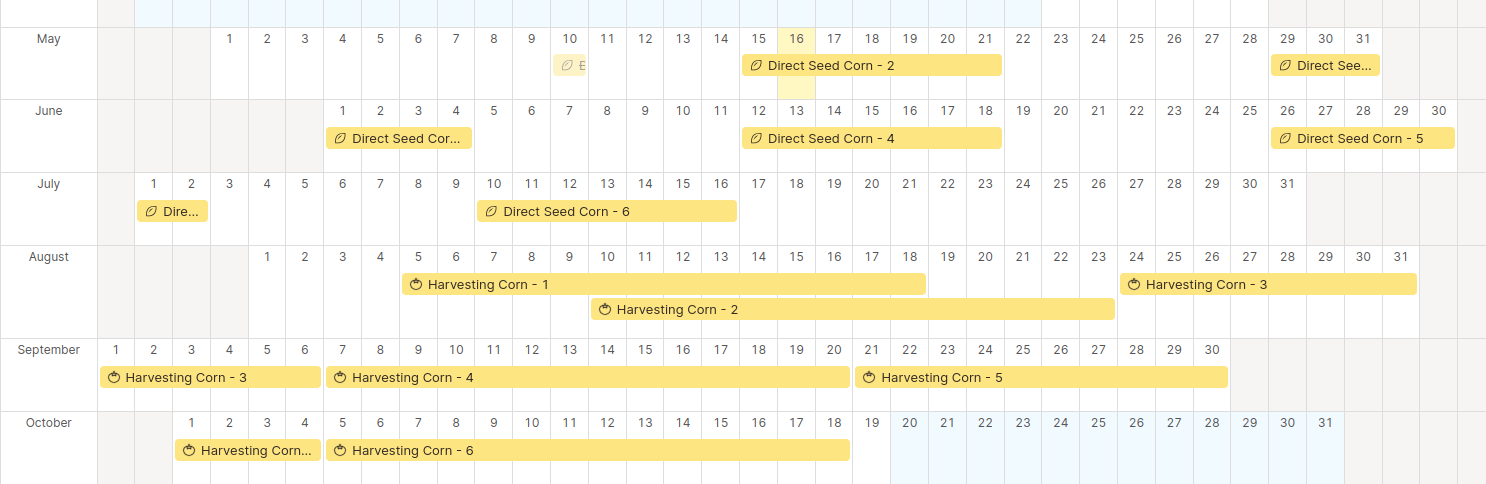
Using this information, it is so simple to move different crops around between your beds, and plan for succession plantings. I don’t have to guess anymore if the lettuce I planted in Bed #3 is going to be ready by the time the tomato starts are ready to go in. Or if I need to sow another round of corn to have fresh ears to pick at the end of September.
Granted - this is our first season using the tool so we can’t say anything specific about the accuracy of the predictions (and they are just that - predictions - nothing is guaranteed in gardening!) but we will definitely report back on how it goes.
Seedtime has some excellent demonstration videos and tutorials on their site, but I wanted to share some of what we are doing this year and some quick tips that I’ve found while getting the beds put in this year.
Task List
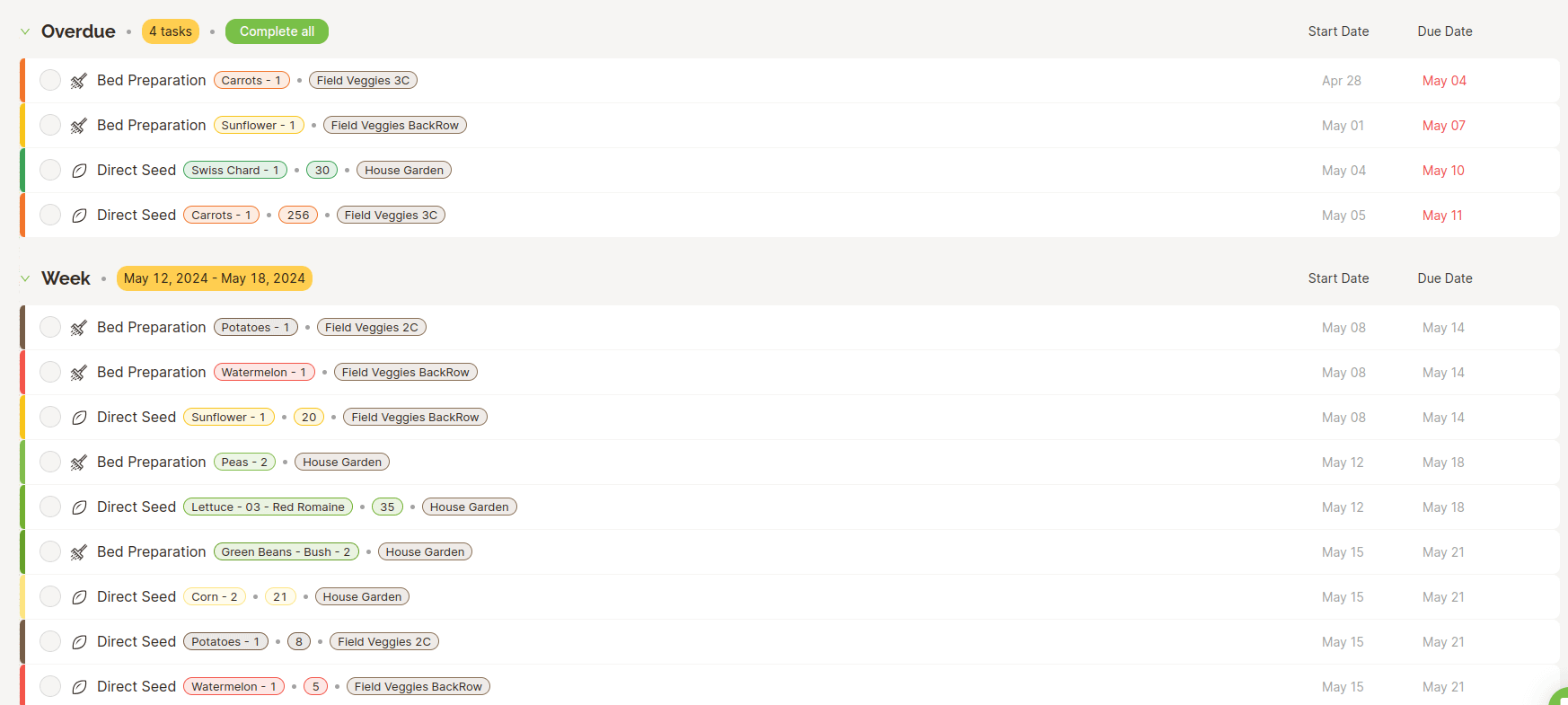
The other thing I really like about the Seedtime app is the task-list. Once you have your garden locations and crop calendar set up, Seedtime will generate a list of tasks that you need to complete each week. Direct seed cucumbers, starting tomatoes in the green house, preparing the bed for carrots that need to go in next week - it’s trivial to see what specific tasks need to be done this week and what isn’t needed until later (or where you’ve fallen behind!). Armed with this task list, I know that when I’ve marked everything off, I’m done with required gardening for the week and everything else is just for fun. You can see in the screenshot below that I’m a bit behind schedule this week and need to spend some more time in the garden!
Calendar View
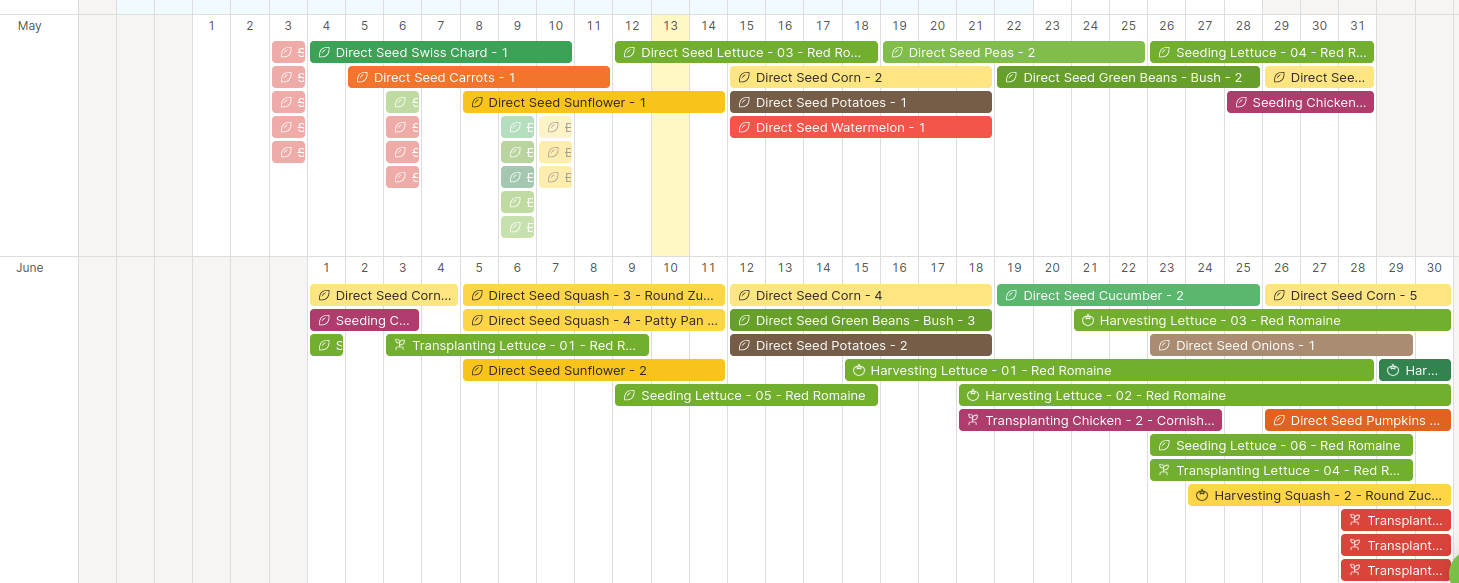
The Seedtime Calendar module shows all of your planned crops and growing timelines at once. You can quickly see when is the appropriate time to sow succession plantings, and gives the birds-eye view of when you’ll be harvesting each planting. This interface allows an easy click-and-drag style interface that lets you simply slide plantings around.
Layout View
Note: The Layout view is only included with a paid subscription to Seedtime. This wasn’t very clear from the marketing material when I first signed up, but we felt that having the layout/map view would be well worth the subscription price. If you have just a few small beds where it’s easy to keep track of where things are, then you could probably get by with the free tier. For our situation with multiple garden plots, we’ve found huge value in making full use of the layout tool.
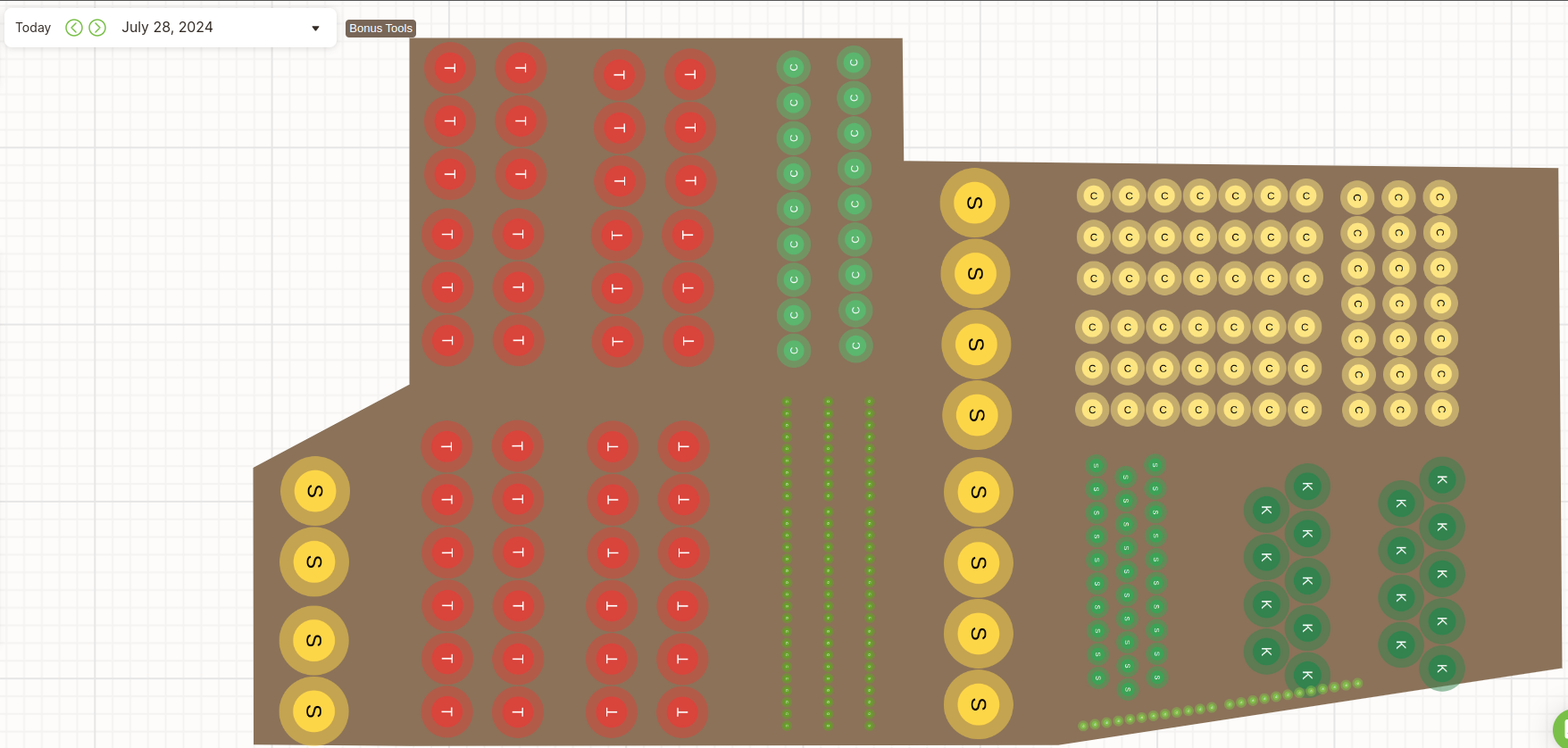
Not only does the layout let you map out your beds, but when coupled with the calendar and harvest timelines, you can get a full picture of what your bed is going to look like for the entire year - almost like a “garden simulator” but for real life! I made the short clip below showing the progression of the bed that we have right up at the house. This is going to be our “picking” garden - all the things that we want to pick to eat fresh through the summer, growing literally right outside of our front door.
Custom Crop Types
Seedtime maintains a library of the common crops and even specific cultivars. This year they had everything that we wanted to plant already in the library, which really cut down on the data entry. This year we’re also taking a stab at raising meat chickens (a topic for another blog post!) and I wanted to see if I could track those on the same calendar - and to my delight it works! You just have to re-imagine your major livestock milestones in terms of “seeding”, “transplanting” and “harvesting”.
This year I put both rounds of meat chickens as “variety” of the “Chicken” crop and setting the “transplant” and “harvest” dates to the dates that chicks move from the brooder to pasture and from the pasture to the freezer, respectively. I took a similar approach with the egg layers as well, treating the “maturity” date as when we could expect to start getting eggs and harvest window is 2 years. I’m not convinced that this part is necessary, but it is helpful to see the egg production dates on the calendar since we still need to put together some proper nesting boxes.
Category: Chicken
Variety: CornishX
Days to transplant (move out of brooder): 21 days
Days to maturity (from “Seeding”): 56 days
Harvest Window: 14 days
Category: Chicken
Variety: Eggs
Days to transplant (move out of brooder): 21 days
Days to maturity (from “Seeding”): 126 days
Harvest Window: 735 days
Once all the data is in, you just set your “seed” date, which is the day the chicks were hatched, and then Seedtime will happily generate a timeline for your “crop”. Our fist batch of Cornish are hatching at the end of May, we’ll move them out to pasture mid-June, and processing needs to happen somewhere during the last week of July.
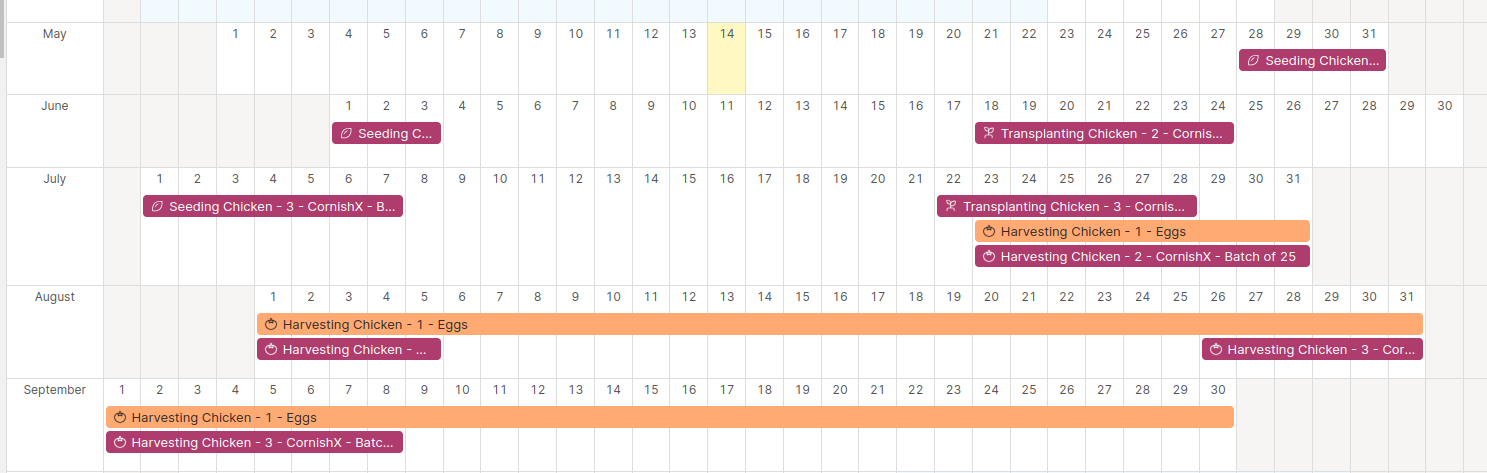
I’m certain that this isn’t exactly what they had in mind when they built Seedtime, but I’m a huge fan of using software that is flexible to my needs, and in this category they definitely hit the mark for us.
Seedtime is still in beta and does have some small annoyances with the user interface, but I haven’t bumped into anything yet that can’t be worked around or gotten used to. Overall the application has helped us immensely this year with our garden plan keeping us focused on the most important tasks to do so we can optimize our time and efforts in the garden. It’s still impossible to predict how abundant our harvest will be, but I can definitely say that Seedtime is certainly helping.
So - if you are behind on your gardening this year or just need a better way to get organized, I’d highly recommend that you check out the Seedtime app!
Full disclosure - We’ve enjoyed the Seedtime app so much this season that we signed up to be affiliates. If you sign up using the links in this post you and us both will get $5 worth of seeds from the Seedtime online seed store. If you later decide to upgrade to a paid subscription, we earn a small commission which we will use to help fund this fund this blog!
Even if you don’t want seeds, please consider subscribing and following along on our adventure of a lifetime!